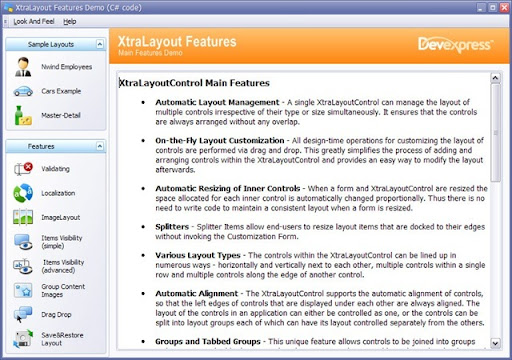
Here is a screen shot of the Developer Express Layout Control Main Demo:
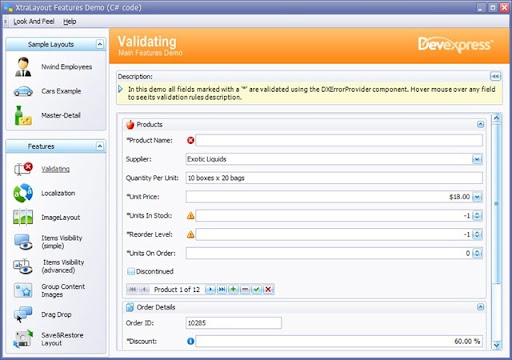
If I click a feature, such as Validating, I get a screen shot similar to this:
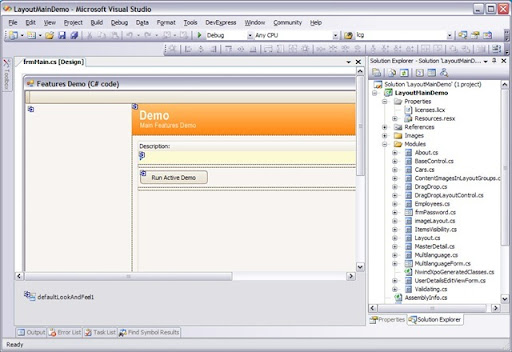
Its a nice demo - I want to learn from it, and so I open the source code for the demo that is included with my subscription where I see something in VS2005 similar to this:
Hmm... there are a LOT of custom User Controls and I start looking/ learning (as I suspect most users may) by looking at the main form (frmMain) and attempt to "go backwards" through the code. Here is the code behind frmMain.cs:
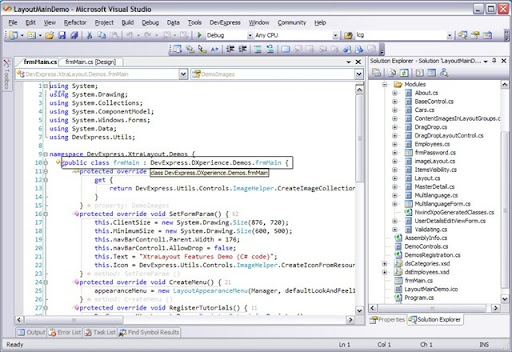
I highlighted where the form inherits from a base form "DevExpress.DXperience.Demos.frmMain". Can you see it in the rectangle? Its a little frustrating to chase down code in a demo, but hey... okay... so I click on "Go to Definition" and this is what I get:
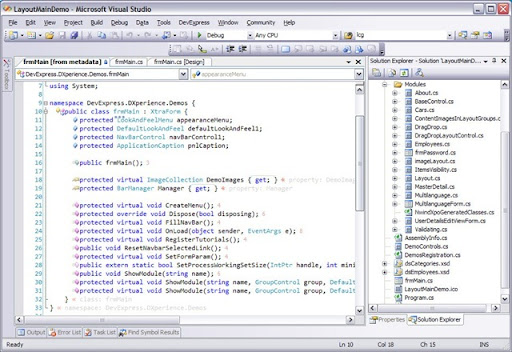
* This is my summary *
First (metatdata): Notice... or... look carefully... the base or inherited class I chased down (the very first step I took to understand the demo code) is "FROM METADATA" and this is just "wrong" (IMO) - for any demo. Isn't a demo supposed to include the code? Inheriting from classes that are not included is not the best choice (IMO). I found numerous objects that inherit from classes that are not contained directly in the demo.
DevExpress: Please, do NOT create a demo that utilizes custom controls or features that are hidden within your source code library! I am fairly certain that the base class "frmMain" is not a standard control for your library and I am also certain that this confuses users and does not help them. Why is this "frmMain" not part of the demo solution? I certainly can understand that some elements are common to many demo solutions, but they should simply be referenced as a separate "common" project, should they not? The common projects should be included DIRECTLY in each demo solution.
Second (organization): I started "browsing" the code and looked at the "BaseControl" which inherits from some TutorialControl which is located in a file named DemoControls.cs; yet the BaseControl is not part of DemoControls, it is special and gets its own file. However, for some reason the LayoutAppearanceMenu is also located in the DemoControls.cs file. What I am getting at is that there is a very difficult to follow pattern for why certain classes are located within certain files. There really needs to be some organization and logic followed to make it easy to locate objects. A possible simple approach I might recommend would be a file for every class. Grouping classes into files without clear understanding of any reasoning for grouping them makes the code more difficult to understand.
Why is the "TutorialControl" and the "LayoutAppearanceMenu" contained in DemoControls? I don't see the logical relationship here... maybe someone else does???
Third (Isolation): These demos, obviously, offer many benefits. For example, I was trying to understand how to properly deal with Visual Inheritance and understand Visual Studio's problem with collection members in inherited or derived forms. To understand: if someone adds a DevExpress LayoutControl to a base user control or form and then tries to inherit or derive a form from that base, the LayoutControl would be unusable in the designer because Visual Studio does not support adding, removing, or changing collections via the designer in a derived form when the source collection is in a base class.
So why am I mentioning isolation?
Well, I suspect most users look at the choices within a Demo or the "Features" such as Validating, Localization, Image Layout , etc and they just want to understand that specific feature. This really screams or demands that code is NOT inherited. Most users (I suspect) want to see the all the code in one spot, where they can follow the logic, where they don't chase down inheritance, and where they don't get confused where pieces of the puzzle aren't even located within the demo. I suggest that each "feature" be self-contained and easy-to-follow.
This post is not meant to be a complaint, it is meant to suggest what I feel is the perspective of the typical end-user - the one who actually needs and uses the various demos. I am trying to share the overall experience and I simply feel the experience could be improved. Ironically, there is no specific demo for visual inheritance - it is addressed in every demo. I consider Visual Inheritance, custom user controls, deep inheritance chains, etc. to be advanced examples. It just does not seem right to make every demo based on advanced functionality and I stand by my premise that no demo should be pieced together with significant custom code elements that are not included in the demo directly, such as the frmMain.cs file I highlighted.


23 comments:
I have done the same consideration almost a year ago when i try to learn from the source code of the demos.
I fully agree with you ...
Hi Trevor,
Yes, well said, I feel like you.
Did you send this blog post to DevEpress ?
Regards,
Marc
Ha! Good that you posted this blog link in the forum, as DevExpress answered there :
http://community.devexpress.com//forums/p/58763/198711.aspx#198711
where Roman mentionned an interesting link :
Simple Application Framework for .NET
http://www.devexpress.com/Support/BestPractices/NET/SAP/
Regards,
Marc
From a professional full-time software developer: spot on. You hit the nail right on the head with your post. There are many things about the DevExpress controls which are frustratingly out of reach simply because it takes less time and effort to rewrite things myself or inherit standard .Net controls because they provide no practical demos (I would go as far as to call them completely useless eye-candy and nothing more) and I simply can't be bothered trawling through their forums and knowledge base in the hope that someone else has already asked for whatever I'm looking for and gotten a short, succinct answer. The most recent example was today when trying to decipher their demos to work out how to add icons to XtraGrid cells. Complete waste of time...
If you're going to bother putting ANY kind of supporting code with something like this I would suggest, in order of my preference:
1) How-Tos
eg- for XtraGrid, have short snippets explaining how to add icons to cells, custom-draw cells based on certain values, get the maximum value in a column etc
2) USEFUL sample code
Giant eye-candy demos are not only useless but frustrating and borderline insulting
3) Tutorials
If USEFUL functioning source code can't be provided, at least provide guides explaining HOW to achieve particular things and WHY. This is similar to point 1 though more targeted at amateur/hobbyist/junior developers.
For the most part I find DevExpress excellent. Their control suite is powerful, flexible and reliable. DevExpress support is amazing and definitely make the subscription fees worth while. The only thing that lets them down is the demos.
I too agree with all of your comments. DevExpress is an excellent component library but trying to figure out how to use its various aspects is dauntingly difficult. And a waste of time. It's chasing after complexity for just complexity's sake. This appears to be a common problem with many "professional" programmers - Make it so difficult that nobody else can understand it. I plan to write a paper about this. I have to name it something...The Over Complexity Syndrome.... Any suggestions?
Thanks.
- Grant
I am trying to learn DevExpress on a 30 day trial. I have been able to write ONE function that works in two weeks, and for that, I had to convert it from C# to Visual Basic. Finding sample code that actually does something, has been tough. I may not purchase the product if I cannot find more informative help. Help!
I am surprised you are having so much difficulty.
1) Ask the Support Center, they usually provide an answer next day if you don't find the answer there.
http://www.devexpress.com/Support/Center/
2) Ask the users of the products in the very active forums:
http://community.devexpress.com/forums/
Your blog has helped me a lot in completing my online degree course. I would recommend your blog to everyone who wants to get help in their academic studies. Thanks a lot
Logo design companies
Your article is very informative. You have written it very well. I have bookmarked you website. Thanks for sharing.
dissertation writing assistance
Thank you very much for the information provided! I was looking for this data for a long time, but I was not able to find the trusted source.
The concept of your blog is really very informative. I definitely share your views to my close friends.
Cool blog you got here. I'd like to read a bit more concerning this topic. Thanks for giving this info.
Good to know about this software. I believe this will be much helpful for me to have best things especially for writing my academic papers.
Your artistic explanation really impressed me man! It’s a great way of sharing the useful information.
office automation services
hearing aid Pakistan
hearing aids in lahore
custom suits
ad agency
chemical industries in lahore
Architecture Designs in lahore
mbbs in china
hearing clinic in lahore
Hamd Technologies is providing the best Zoho books accounting software for small businesses.
Bookkeeping Services Pakistan
This kind of English Literature Dissertation help is very limited on the internet. Nice to find the post related to my searching criteria. Your updated and informative post will be appreciated by blog-loving people.
Very useful information! None of my language teachers took the time to thoroughly describe every aspect of write my paper. The comments you can give at the end of each article are a form of evaluation. As a result, I had a constant yearning for it! This essay can assist you in improving your ability to write a paper. Thank you very much!
Effective communication of Financial statements analysis findings is crucial for stakeholders and decision-makers.
For top-tier transportation solutions in Dubai, Foremost Drive offers unparalleled Safe Driver Dubai services. Our dedicated chauffeurs are committed to providing secure driving options tailored to your specific needs, whether it's for business, events, or personal travel. We ensure that every ride is handled with the utmost professionalism and safety, giving you peace of mind during your journey. To explore more about our reliable driving services and how we can assist you, Learn More Here.
zatca e-invoicingis a digital invoicing system introduced by the Zakat, Tax and Customs Authority in Saudi Arabia to standardize and modernize financial transactions.
Post a Comment